<?xml version="1.0" encoding="utf-8"?>
<feed xmlns="http://www.w3.org/2005/Atom">

  <title><![CDATA[My Octopress Blog]]></title>
  <link href="http://chrisforest.github.io/atom.xml" rel="self"/>
  <link href="http://chrisforest.github.io/"/>
  <updated>2015-07-08T19:26:42+08:00</updated>
  <id>http://chrisforest.github.io/</id>
  <author>
    <name><![CDATA[Your Name]]></name>
    
  </author>
  <generator uri="http://octopress.org/">Octopress</generator>

  
  <entry>
    <title type="html"><![CDATA[1亿条数据模拟]]></title>
    <link href="http://chrisforest.github.io/blog/2015/07/08/20150628/"/>
    <updated>2015-07-08T19:23:30+08:00</updated>
    <id>http://chrisforest.github.io/blog/2015/07/08/20150628</id>
    <content type="html"><![CDATA[<h5>在oracle中插入</h5>

<h6>使用pl/sql developer数据生成器</h6>

<p>参考<a href="http://wenku.baidu.com/link?url=ewPnBsCVyDNPG0vJFZHHbNyLMXnKw1eM9-CFoIzY9qS4adhUCjar8DfTB1AP0qjHzMQf5FqBNPmruhJkLv1qh5euDOMuS6IuSWtgE4eIorO&amp;qq-pf-to=pcqq.c2c">http://wenku.baidu.com/link?url=ewPnBsCVyDNPG0vJFZHHbNyLMXnKw1eM9-CFoIzY9qS4adhUCjar8DfTB1AP0qjHzMQf5FqBNPmruhJkLv1qh5euDOMuS6IuSWtgE4eIorO&amp;qq-pf-to=pcqq.c2c</a></p>

<h6>报错ORA-01653</h6>

<p>表空间扩展失败，参考<a href="http://www.2cto.com/database/201201/116522.html">http://www.2cto.com/database/201201/116522.html</a>
解决方法</p>

<pre><code>alter tablespace USERS
add datafile '/u01/app/oracle/oradata/XE/users2.dbf' size 10240M;
</code></pre>

<h6>报错ORA-12953</h6>

<p>超过了允许的最大数据库大小。原因是oracle11g xe版本只支持11g大小用户空间。
解决方法，暂无。</p>

<h5>在mongodb中插入</h5>

<p>编写程序模拟数据，采用insert batch操作，每10000条数据一插。对于某些可能有意义的字段采用了枚举，枚举数目为10个。</p>

<h6>报错</h6>

<p>第一次在2363万条数据时报错</p>

<pre><code>Exception in thread "main" org.springframework.dao.DataAccessResourceFailureException: Operation on server 114.212.189.143:27017 failed; nested exception is com.mongodb.MongoException$Network: Operation on server 114.212.189.143:27017 failed
</code></pre>

<p>第二次在7000多万条时报错。查看数据库，发现只有4000多万数据。我当时怀疑可能mongodb的insert操作是异步的，导致了大量insert堆积，最后丢失数据。
我决定再插一次，如果还不成功，就分多次插。然而这次容器崩溃了。</p>

<h6>容器崩溃</h6>

<p>shard1和router崩溃了，重启无效。删除容器后新建也无效。
一开始我怀疑是镜像坏掉了，于是使用袁忠良配过的另一个镜像，那个镜像需要手动启动数据库。手动启动的时候报错journal大小不足3g，无法启动数据库。于是查看，发现服务器存储空间已经耗竭。
解决方法，暂无，目前先插入5000万条数据。</p>
]]></content>
  </entry>
  
  <entry>
    <title type="html"><![CDATA[远程mongodb的运行效果]]></title>
    <link href="http://chrisforest.github.io/blog/2015/07/08/20150627/"/>
    <updated>2015-07-08T16:20:30+08:00</updated>
    <id>http://chrisforest.github.io/blog/2015/07/08/20150627</id>
    <content type="html"><![CDATA[<p>未分片的运行耗时37秒，分2片的运行耗时39秒，对比oracle最好的数据是63秒。</p>
]]></content>
  </entry>
  
  <entry>
    <title type="html"><![CDATA[在服务器上的mongodb分片]]></title>
    <link href="http://chrisforest.github.io/blog/2015/07/08/20150626/"/>
    <updated>2015-07-08T15:52:33+08:00</updated>
    <id>http://chrisforest.github.io/blog/2015/07/08/20150626</id>
    <content type="html"><![CDATA[<p>在服务器上的mongodb分片</p>

<h6>建立mongodb容器</h6>

<pre><code>sudo docker run --name mongodbRouter -d -p 27017:27019 mongo
sudo docker run --name mongodbShard1 -d  mongo
sudo docker run --name mongodbShard2 -d  mongo
</code></pre>

<h6>获得容器ip</h6>

<p>分别为172.17.0.15,172.17.0.16,172.17.0.17</p>

<h6>启动mongodb</h6>

<pre><code>mongos --port 27019 --configdb 172.17.0.15:27017
mongo --port 27019
sh.addShard("172.17.0.16:27017")
sh.addShard("172.17.0.17:27017")
sh.enableSharding("fitetl")
sh.shardCollection("fitetl.YJBZ_00701_B0349H245010001", {"NUM":1})
</code></pre>
]]></content>
  </entry>
  
  <entry>
    <title type="html"><![CDATA[从oracle到mongodb的数据迁移]]></title>
    <link href="http://chrisforest.github.io/blog/2015/07/08/20150624/"/>
    <updated>2015-07-08T15:27:40+08:00</updated>
    <id>http://chrisforest.github.io/blog/2015/07/08/20150624</id>
    <content type="html"><![CDATA[<h6>使用spoon进行数据迁移</h6>

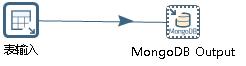
<p>使用etl工具进行数据迁移。关于spoon的用法，首先搭建如图的结构。表输入为oracle数据库表，mongoDB output为mongoDB数据库的输出。
<img src="http://chrisforest.github.io/images/20150624/1.jpg" alt="image" />
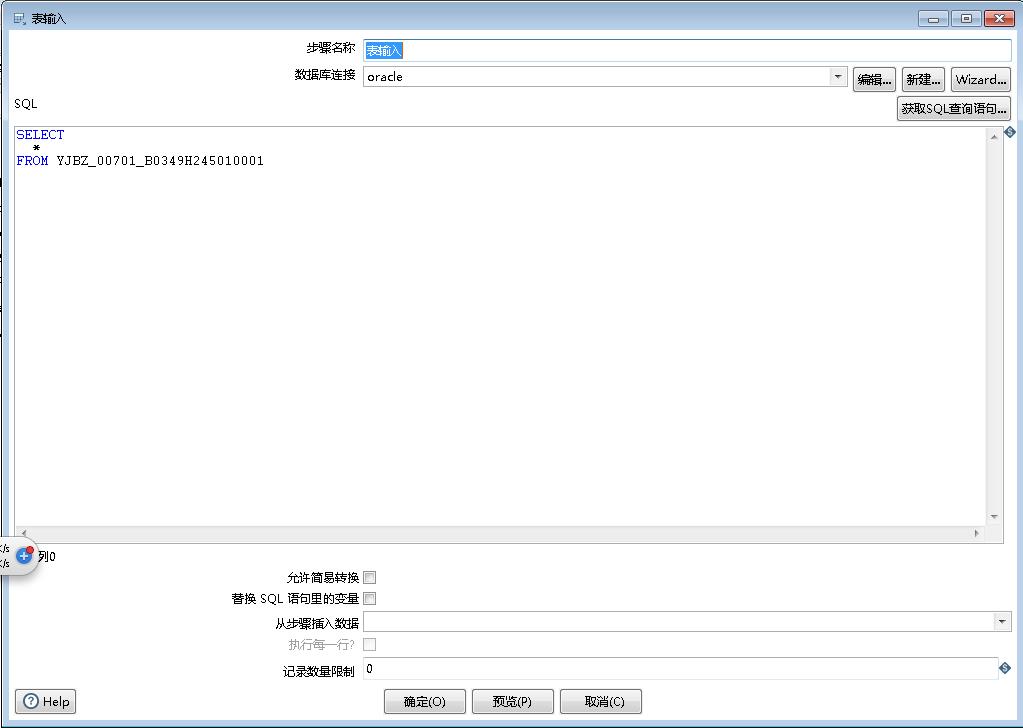
然后分别编辑输入输出，编辑oracle数据库:
<img src="http://chrisforest.github.io/images/20150624/2.jpg" alt="image" />
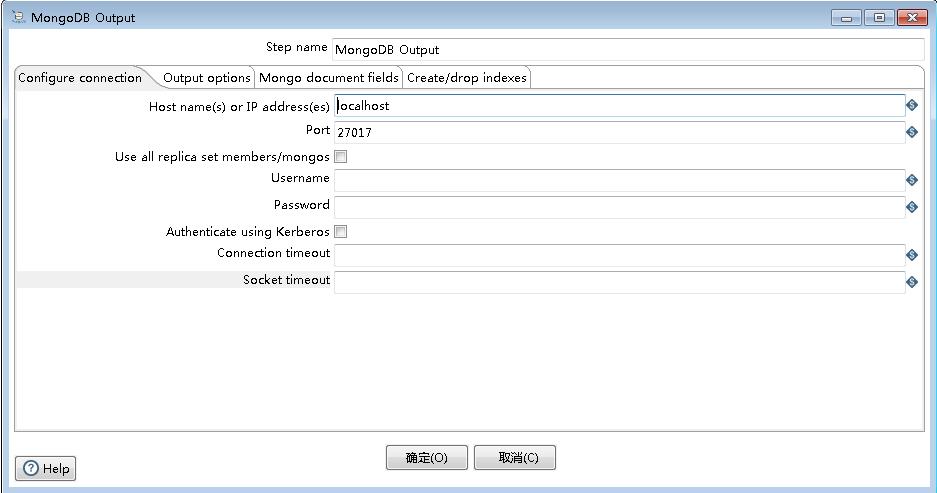
编辑mongoDB数据库:
<img src="http://chrisforest.github.io/images/20150624/3.jpg" alt="image" /></p>

<h6>报错</h6>

<p>运行到84万多条数据的时候就报错了：
<img src="http://chrisforest.github.io/images/20150624/4.png" alt="image" />
一开始我以为是mongodb的cursor关闭了，因为看文档说mongodb的cursor默认十分钟关闭，而spoon迁移大概10分钟的时候停了。因为spoon没有改相关项的选项，所以后来打算自己写程序，然而自己写程序后，发现用不到mongodb的cursor。而且也在83万多数据的时候出问题，卡住不动了。
后来可能的原因是数据一次读取过多，因为2次出错读取的数据差不多多（83万和84万），所以下一步会尝试分多次读取数据，比如50万数据一读。
最后找到问题了，是mongodb32位存储空间不足，解决方法是在远程服务器上运行64位mongodb。迁移用时约38分钟。</p>
]]></content>
  </entry>
  
  <entry>
    <title type="html"><![CDATA[应用数据库都在远程的profile]]></title>
    <link href="http://chrisforest.github.io/blog/2015/07/08/20150620/"/>
    <updated>2015-07-08T15:04:50+08:00</updated>
    <id>http://chrisforest.github.io/blog/2015/07/08/20150620</id>
    <content type="html"><![CDATA[<p>把客户端也放到远程上了。单位是秒。测到的最小值是63秒。
测试了一些数据，列代表所少条数据分一线程，行代表一次读多少数据</p>

<table class="table table-bordered table-striped table-condensed">
   <tr>
      <td></td>
      <td>500</td>
      <td>1k</td>
      <td>2k</td>
      <td>5k</td>
      <td>10k</td>
      <td>20k</td>
      <td>50k</td>
      <td>100k</td>
   </tr>
   <tr>
      <td>500</td>
      <td>79</td>
      <td>***</td>
      <td>***</td>
      <td>***</td>
      <td>***</td>
      <td>***</td>
      <td>***</td>
      <td>***</td>
   </tr>
   <tr>
      <td>1k</td>
      <td></td>
      <td>67</td>
      <td>***</td>
      <td>***</td>
      <td>***</td>
      <td>***</td>
      <td>***</td>
      <td>***</td>
   </tr>
   <tr>
      <td>2k</td>
      <td></td>
      <td></td>
      <td>67</td>
      <td>***</td>
      <td>***</td>
      <td>***</td>
      <td>***</td>
      <td>***</td>
   </tr>
   <tr>
      <td>5k</td>
      <td></td>
      <td></td>
      <td>72</td>
      <td>63</td>
      <td>***</td>
      <td>***</td>
      <td>***</td>
      <td>***</td>
   </tr>
   <tr>
      <td>10k</td>
      <td>75</td>
      <td>66</td>
      <td>69</td>
      <td>66</td>
      <td>63</td>
      <td>***</td>
      <td>***</td>
      <td>***</td>
   </tr>
   <tr>
      <td>20k</td>
      <td></td>
      <td></td>
      <td>66</td>
      <td></td>
      <td></td>
      <td>65</td>
      <td>***</td>
      <td>***</td>
   </tr>
   <tr>
      <td>50k</td>
      <td></td>
      <td></td>
      <td>64</td>
      <td></td>
      <td></td>
      <td></td>
      <td>68</td>
      <td>***</td>
   </tr>
   <tr>
      <td>100k</td>
      <td></td>
      <td></td>
      <td>64</td>
      <td></td>
      <td></td>
      <td></td>
      <td></td>
      <td>77</td>
   </tr>
   <tr>
      <td></td>
   </tr>
</table>


<p>具体数据：
500一线程500分一段
共耗时79秒
之前的3步各耗时0.826秒，60.961秒，16.697秒</p>

<p>1000一线程1000分一段
共耗时67秒
之前的3步各耗时0.825秒，53.675秒，10.948秒</p>

<p>2000一线程2000分一段
共耗时67秒
之前的3步各耗时1.014秒，52.836秒，11.675秒</p>

<p>5000一线程2000分一段
共耗时72秒
之前的3步各耗时0.8秒，59.145秒，10.829秒</p>

<p>5000一线程5000分一段
共耗时63秒
之前的3步各耗时0.814秒，45.701秒，16.189秒</p>

<p>10000一线程500分一段
总耗时75秒
之前的3步各耗时0.817秒，61.304秒，11.118秒</p>

<p>10000一线程1000分一段
总耗时66秒
之前的3步各耗时0.840秒，53.079秒，11.118秒</p>

<p>10000一线程2000分一段
总耗时69秒
之前的3步各耗时0.949秒，50.165秒，16.248秒</p>

<p>10000一线程5000分一段
总耗时66秒
之前的3步各耗时0.815秒，47.927秒，16.156秒</p>

<p>10000一线程10000分一段
共耗时63秒
之前的3步各耗时0.824秒，44.952秒，16.265秒</p>

<p>20000一线程2000分一段
总耗时66秒
之前的3步各耗时0.809秒，50.084秒，11.225秒</p>

<p>20000一线程20000分一段
总耗时65秒
之前的3步各耗时0.824秒，45.867秒，16.228秒</p>

<p>50000一线程2000分一段
总耗时64秒
之前的3步各耗时0.807秒，50.227秒，10.895秒</p>

<p>50000一线程50000分一段
共耗时68秒
之前的3步各耗时1.007秒，49.458秒，16.054秒</p>

<p>100000一线程2000分一段
总耗时64秒
之前的3步各耗时1.130秒，50.450秒，10.815秒</p>

<p>100000一线程100000分一段
共耗时77秒
之前的3步各耗时1.472秒，65.458秒，8.054秒</p>
]]></content>
  </entry>
  
  <entry>
    <title type="html"><![CDATA[应用在本地数据库在远程的profile]]></title>
    <link href="http://chrisforest.github.io/blog/2015/07/08/20150619/"/>
    <updated>2015-07-08T14:57:41+08:00</updated>
    <id>http://chrisforest.github.io/blog/2015/07/08/20150619</id>
    <content type="html"><![CDATA[<h6>采用插装log输出</h6>

<p>在sql语句和报文生成的前后插入了计时语句，log编写参考了<a href="http://blog.csdn.net/seven_cm/article/details/26849821">http://blog.csdn.net/seven_cm/article/details/26849821</a> ，这是某次操作的结果总结。
总共耗时386秒
其中超过1秒的操作
1、    对YJBZ_00701_B0349H245010001计数。由于表超过3M行，总共耗时8.630秒。
2、    查询遍历YJBZ_00701_B0349H245010001内容。每10000条数据新建一个线程查，线程上查找大约花费几百毫秒，报文生成花费几毫秒，总共300多个线程，一共花费262.266秒。
3、    将报文合并，总共花费110.731秒
三项加起来384.587秒，占总时间的99.6%</p>

<h6>采用visualvm</h6>

<p>没有成功。试了几次，每次中途就没响应了。
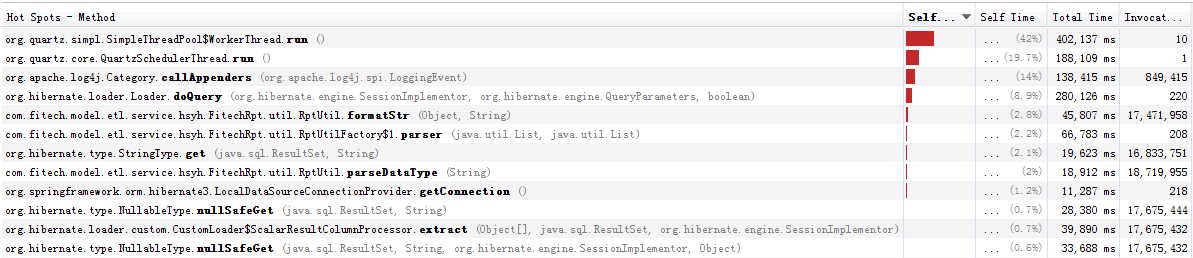
<img src="http://chrisforest.github.io/images/20150619/1.png" alt="image" />
这是失去响应之前的截图
第一位是org.quartz.simpl.SimpleThreadPool$WorkerThread.run()
第二位是org.quartz.core.QuartzSchedulerThread.run()
第三位是org.apache.log4j.Category.callAppenders(org.apache.log4j.spi.LoggingEvent)
第四位是org.hibernate.loader.Loader.doQuery(org.hibernate.engine.SessionImplementor, org.hibernate.engine.QueryParameters, boolean)
从第五位开始数值就很小了。</p>

]]></content>
  </entry>
  
  <entry>
    <title type="html"><![CDATA[在远程服务器上运行exportData]]></title>
    <link href="http://chrisforest.github.io/blog/2015/07/08/20150618/"/>
    <updated>2015-07-08T14:03:04+08:00</updated>
    <id>http://chrisforest.github.io/blog/2015/07/08/20150618</id>
    <content type="html"><![CDATA[<h5>将数据库放到服务器上</h5>

<h6>事先的工作</h6>

<p>已有一个docker容器oracle11g xe，22端口映射到32772，1521端口映射到32771，8080端口映射到32770。</p>

<h6>putty</h6>

<p>登录114.212.189.143 port32772</p>

<pre><code>sqlplus sys/oracle as sysdba
create user east identified by east;
create user etl identified by etl;
grant dba to east;
grant dba to etl;
shutdown immediate
STARTUP MOUNT
ALTER SYSTEM ENABLE RESTRICTED SESSION;
ALTER SYSTEM SET JOB_QUEUE_PROCESSES=0;
ALTER SYSTEM SET AQ_TM_PROCESSES=0;
ALTER DATABASE OPEN;
ALTER DATABASE CHARACTER SET INTERNAL_USE ZHS16GBK;
SHUTDOWN IMMEDIATE
STARTUP
</code></pre>

<h6>psftp</h6>

<p>open 114.212.189.143 32772</p>

<pre><code>put 路径\east.dmp
put 路径\etl.dmp
</code></pre>

<h5>将应用放到服务器上</h5>

<h6>事先的工作</h6>

<p>已有一个docker容器java8，id是fbbf&hellip;
将exportData打成jar包，取名ccc.jar</p>

<h6>psftp</h6>

<pre><code>open 114.212.189.143 22
put ccc.jar
</code></pre>

<h6>putty</h6>

<p>登录114.212.189.143 port22</p>

<pre><code>sudo docker exec -ti fbbf /bin/bash
java -jar ccc.jar
</code></pre>

<h6>应用卡住，然后报错</h6>

<pre><code>org.xml.sax.SAXParseException: schema_reference.4: Failed to read schema document 'http://www.springframework.org/schema/beans/spring-beans-2.0.xsd', because 1) could not find the document; 2) the document could not be read; 3) the root element of the document is not &lt;xsd:schema&gt;.
</code></pre>

<p>参考<a href="http://blog.csdn.net/bluishglc/article/details/7596118">http://blog.csdn.net/bluishglc/article/details/7596118</a> ，spring xml配置文件中指定的xsd文件读取不到了，原因是reference中不同jar包对spring-beans-2.0.xsd的多次定义。
spring在加载xsd文件时总是先试图在本地查找xsd文件(spring的jar包中已经包含了所有版本的xsd文件)，如果没有找到，才会转向去URL指定的路径下载。
dwr.jar中无用的xsd定义覆盖了有用的定义，导致需要上网加载xsd文件。先前本机由于联网，该问题没有暴露，容器没有网络连接，所以报错。
解决方法，删除dwr.jar包。目前exportData正常运行，对以后可能的影响未知。</p>
]]></content>
  </entry>
  
  <entry>
    <title type="html"><![CDATA[exportData使用的sql查询]]></title>
    <link href="http://chrisforest.github.io/blog/2015/07/08/20150616/"/>
    <updated>2015-07-08T13:33:18+08:00</updated>
    <id>http://chrisforest.github.io/blog/2015/07/08/20150616</id>
    <content type="html"><![CDATA[<p>com/fitech/model/etl/service/hsyh/ETLConductExportService.java:56</p>

<pre><code>from EtlTaskInfo e where e.taskId= 61
</code></pre>

<p>表ETL_TASK_INFO</p>

<p>com/fitech/model/etl/service/hsyh/ETLConductExportService.java:59</p>

<pre><code>select config_value from east.sys_config where config_key='need_hand_export'
</code></pre>

<p>表SYS_CONFIG</p>

<p>com/fitech/model/etl/service/hsyh/ETLConductExportService.java:68</p>

<pre><code>select base_rpt_id,model_name,main_type,rpt_en_name from east.base_rpt_info where rpt_name='交易流水'
</code></pre>

<p>表BASE_RPT_INFO</p>

<p>com/fitech/model/etl/service/hsyh/ETLConductExportService.java:73</p>

<pre><code>select count(0) from east.YJBZ_00701_B0349H245010001
</code></pre>

<p>表YJBZ_00701_B0349H245010001</p>

<p>com/fitech/model/etl/service/hsyh/ETLConductExportService.java:78</p>

<pre><code>delete from east.YJBZ_ETL_CHECK where TASK_NAME='交易流水' and TERM='20141231'
</code></pre>

<p>表YJBZ_ETL_CHECK</p>

<p>com/fitech/model/etl/service/hsyh/ETLConductExportService.java:108</p>

<pre><code>insert into east.convert_log(log_name,log_message,log_time,log_term) values (?,?,?,?)
</code></pre>

<p>表CONVERT_LOG</p>

<p>com/fitech/model/etl/service/hsyh/FitechRpt/service/impl/RptOprServiceImpl.java:248</p>

<pre><code>SELECT FIELD_EN_NAME,FIELD_TYPE FROM east.BASE_FIELD_INFO FIELD_INFO WHERE FIELD_INFO.BASE_RPT_ID = 'yjbz_00701' ORDER BY FIELD_INFO.ORDER_ID ASC
</code></pre>

<p>表BASE_FIELD_INFO</p>

<p>com/fitech/model/etl/service/hsyh/FitechRpt/service/impl/RptOprServiceImpl.java:269</p>

<pre><code>select count(1) from east.YJBZ_00701_B0349H245010001
</code></pre>

<p>表YJBZ_00701_B0349H245010001</p>

<p>com\fitech\model\etl\service\hsyh\FitechRpt\util\RptUtil.java:438</p>

<pre><code>select HXJYLSH,ZJYLSH,BCXH,JYRQ,YXJGDM,NBJGH,JRXKZH,MXKMBH,JYSJ,JZRQ,JZSJ,JYJGMC,JYZH,JYHM,JYXTMC,DFXH,DFJGMC,DFZH,DFHM,JYJE,ZHYE,JDBZ,XZBZ,BZ,YWLX,JYLX,JYQD,JYJZMC,JYJZH,CZGYH,GYLSH,FHGYH,ZY,ZPZZL,ZPZH,FPZZL,FPZH,CBMBZ,SJC,ZHBZ,KXHBZ,CJRQ
from YJBZ_00701_B0349H245010001
where  num&gt;=begIndex and num &lt;+(begIndex+count)
</code></pre>

<p>表YJBZ_00701_B0349H245010001</p>
]]></content>
  </entry>
  
  <entry>
    <title type="html"><![CDATA[如何运行应用]]></title>
    <link href="http://chrisforest.github.io/blog/2015/07/07/20150613/"/>
    <updated>2015-07-07T23:58:45+08:00</updated>
    <id>http://chrisforest.github.io/blog/2015/07/07/20150613</id>
    <content type="html"><![CDATA[<h6>在sql命令行中</h6>

<p>创建2个新用户，east和etl密码是east和etl</p>

<pre><code>create user east identified by east;
create user etl identified by etl;
</code></pre>

<p>赋予dba权限</p>

<pre><code>grant dba to east;
grant dba to etl;
</code></pre>

<h6>在命令行中</h6>

<p>导入数据</p>

<pre><code>imp east/east@localhost/xe fromuser=east touser=east log=no file=（dmp的路径）/east.dmp
imp etl/etl@localhost/xe fromuser=etl touser=etl  log=no file=（dmp的路径）/etl.dmp
</code></pre>

<h6>报错:ora-12899</h6>

<p>在插入数据库的时候报错</p>

<pre><code>IMP-00019: 由于 ORACLE 错误 12899 而拒绝行
IMP-00003: 遇到 ORACLE 错误 12899
ORA-12899: 列 "JACKEYJ"."JK_REGISTER"."OPNAME" 的值太大 (实际值: 21, 最大值: 20)
</code></pre>

<p>原因是数据库的字库问题，更换字库后解决，参考<a href="http://blog.chinaunix.net/uid-10951-id-1762312.html">http://blog.chinaunix.net/uid-10951-id-1762312.html</a> ，在sql命令行中输入</p>

<pre><code>SHUTDOWN IMMEDIATE 
STARTUP MOUNT
ALTER SYSTEM ENABLE RESTRICTED SESSION;
ALTER SYSTEM SET JOB_QUEUE_PROCESSES=0;
ALTER SYSTEM SET AQ_TM_PROCESSES=0;
ALTER DATABASE OPEN;
ALTER DATABASE CHARACTER SET INTERNAL_USE ZHS16GBK;
SHUTDOWN IMMEDIATE
STARTUP
</code></pre>

<p>重新插入即可</p>

<h6>在fitetl程序中</h6>

<p>修改com.fitech.model.etl. service.hsyh.FitechRpt.etl.sysLog.properties
修改db_url=east/east@xe
修改server_ip=localhost
修改server_port=1521</p>

<p>修改applicationContext.xml
<img src="http://chrisforest.github.io/images/20150613/1.png" alt="image" />
<img src="http://chrisforest.github.io/images/20150613/2.png" alt="image" />
共有2段，将192.168.0.89:1521:orcl修改为localhost:1521:xe</p>

<p>修改com.fitech.model.etl.service.hsyh.ExportData.java
此为主方法，
修改任务id，修改为vo.setTaskId(61);
修改日期，修改为vo.setTaskTerm(&ldquo;2014-12-31&rdquo;);</p>

<h6>运行后无报文生成</h6>

<p>原因是base_rpt_info表中有一行多余数据。打开east.base_rpt_info这张表，找到rpt_name为交易流水的行，有2行，把其中base_rpt_id为yjbz_00701的那行，也就是上面一行，删了。</p>

<h6>运行结果</h6>

<p>成功，大约19分钟。</p>
]]></content>
  </entry>
  
  <entry>
    <title type="html"><![CDATA[应用执行流程]]></title>
    <link href="http://chrisforest.github.io/blog/2015/07/07/ying-yong-zhi-xing-liu-cheng/"/>
    <updated>2015-07-07T23:02:16+08:00</updated>
    <id>http://chrisforest.github.io/blog/2015/07/07/ying-yong-zhi-xing-liu-cheng</id>
    <content type="html"><![CDATA[<p>1、\fitetl\src\com\fitech\model\etl\service\hsyh\ExportData.java
<img src="http://chrisforest.github.io/images/20150612/1.png" alt="image" />
程序入口，ETLConductExportService处理主要内容。</p>

<p>2、\fitetl\src\com\fitech\model\etl\service\hsyh\ETLConductExportService.java
<img src="http://chrisforest.github.io/images/20150612/2.png" alt="image" />
主要功能在方法writerUploadFile中实现，由于采用oracle数据库，调用createRptFile生成报文。</p>

<p>3、\fitetl\src\com\fitech\model\etl\service\hsyh\FitechRpt\service\impl\RptOprServiceImpl.java
<img src="http://chrisforest.github.io/images/20150612/3.png" alt="image" />
全部报文，调用方法creRptFileAll</p>

<p><img src="http://chrisforest.github.io/images/20150612/4.png" alt="image" />
调用方法creRpfFileSgl</p>

<p><img src="http://chrisforest.github.io/images/20150612/5.png" alt="image" />
<img src="http://chrisforest.github.io/images/20150612/6.png" alt="image" />
<img src="http://chrisforest.github.io/images/20150612/7.png" alt="image" />
<img src="http://chrisforest.github.io/images/20150612/8.png" alt="image" />
每10000行创建一个新的线程，线程RptExpOprThread用来生成报文。</p>

<p>4、\fitech\model\etl\service\hsyh\FitechRpt\util\RptExpOprThread.java
<img src="http://chrisforest.github.io/images/20150612/9.png" alt="image" />
调用方法createSplitRpt</p>

<p>5、\fitetl\src\com\fitech\model\etl\service\hsyh\FitechRpt\util\RptUtil.java
<img src="http://chrisforest.github.io/images/20150612/10.png" alt="image" />
调用方法createRptFile</p>

<p><img src="http://chrisforest.github.io/images/20150612/11.png" alt="image" />
<img src="http://chrisforest.github.io/images/20150612/12.png" alt="image" />
生成报文文件</p>
]]></content>
  </entry>
  
</feed>